

Few business assets hold as much value as your customer data, and few lose value faster when that data lives in two places at once. Sales teams build their world inside Salesforce; marketing teams build theirs inside HubSpot. Left unconnected, the two steadily drift apart, so leads stall between handoffs, dashboards disagree, and hours disappear into manual updates. The HubSpot Salesforce integration closes that gap, linking both platforms so information moves between them automatically and every team works from the same truth. This guide explains how the integration works, what it synchronizes, and how to configure it to deliver lasting value, free from the data silos that quietly erode revenue.
Quick answer: The native connector keeps contacts, companies, deals, and activities aligned across HubSpot and Salesforce in both directions. It delivers the most value when you first establish which system owns each type of data before activating the sync.
What is HubSpot Salesforce Integration?
It is a native, bidirectional connection that synchronizes data between HubSpot’s marketing platform and Salesforce’s CRM, holding records consistent across both systems. Ranked among the most widely adopted integrations in HubSpot’s App Marketplace, it connects your standard records — from contacts and companies to deals, tickets, and activities — without a single line of custom code. This lets sales keep working in Salesforce and marketing in HubSpot, without either team being forced to abandon the platform they know.
How Data Flows Between the Two Systems
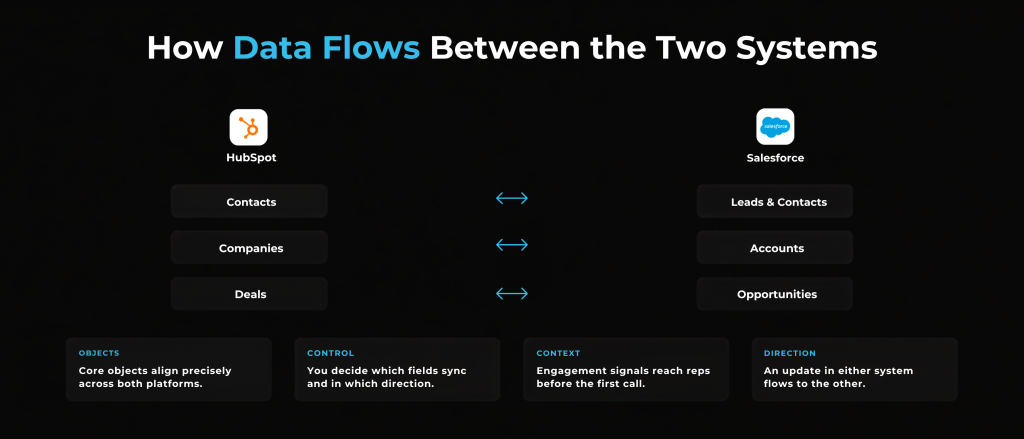
Once the connection is live, the integration mirrors your core records in both directions while leaving you in full control of what moves and how:
- Core objects align precisely — HubSpot contacts correspond to Salesforce leads and contacts, companies to accounts, and deals to opportunities
- Sync rules keep you in command — you decide which fields synchronize and in which direction, so each team retains ownership of the data it depends on
- Marketing intelligence reaches sales — email opens, form submissions, and other engagement signals flow to reps, arming them with context before the first conversation
- The exchange runs both ways — because the sync is bidirectional, an update in either system automatically flows to the other
The Benefits of HubSpot Salesforce Integration
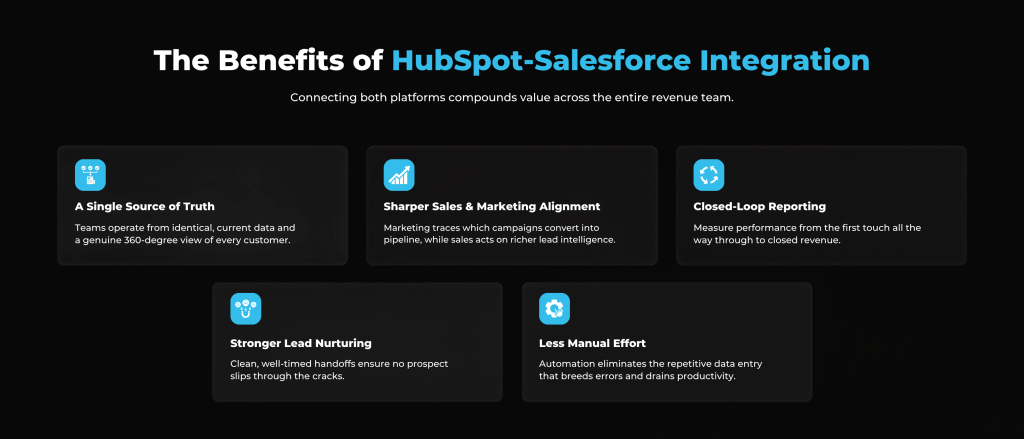
Connecting both platforms compounds value across the entire revenue team:
- A single source of truth — your teams operate from identical, current data and a genuine 360-degree view of every customer
- Sharper sales and marketing alignment — marketing traces which campaigns convert into pipeline, while sales acts on far richer lead intelligence
- Closed-loop reporting — you measure performance from the first touch through to closed revenue
- Stronger lead nurturing — clean, well-timed handoffs ensure no prospect slips through the cracks
- Less manual effort — automation eliminates the repetitive data entry that breeds errors and drains productivity
Common Challenges to Plan for
Like any powerful tool, the integration requires preparation. Knowing where teams typically struggle helps you sidestep the same pitfalls:
- Configuration takes care — mapping fields and setting sync rules correctly is detailed work, and small missteps can introduce data errors that only surface later
- Data overload — syncing more than you need clutters both systems and buries the insights that actually matter
- Ongoing upkeep — as fields, workflows, and data volumes change on both sides, the connection needs regular attention to run cleanly
Is This Integration Right for Your Business?
The integration makes the most sense when your sales team works in Salesforce, your marketing team works in HubSpot, and the two teams depend on each other’s data day to day. If centralizing lead management and giving both teams a shared view are priorities, connecting the platforms pays off quickly. On the other hand, if only one platform is in active use, or your marketing and sales processes rarely intersect, the effort to set up and maintain the connection may outweigh the return for now. The honest deciding factors are how much your teams rely on shared data and whether you can commit the resources to configure and sustain it well.
Choosing Your Integration Approach
Three approaches address virtually every scenario:
- Native integration — handles standard objects capably with minimal technical lift, and satisfies most growing businesses running standard workflows
- Third-party tools — introduce added flexibility for extensive customization, high data volumes, or real-time demands
- Custom API build — suits intricate business logic, advanced data transformation, or specialized reporting requirements
Ultimately, the right fit depends on your data complexity, your reporting ambitions, and how much control you want over the movement of information between the platforms.
What You Need and How to Set It Up
The native connector calls for a few prerequisites:
- HubSpot Professional or Enterprise
- A Salesforce edition with API access
- A Salesforce system administrator, plus a dedicated integration user
Once those are in place, the configuration follows a guided path:
- Connect the two accounts and select your environment
- Map your HubSpot properties to the corresponding Salesforce fields
- Establish your sync rules and define an inclusion list to govern exactly which records synchronize
- Review your settings and confirm every mapping is correct before you go fully live
Best Practices for a Successful HubSpot Salesforce Integration
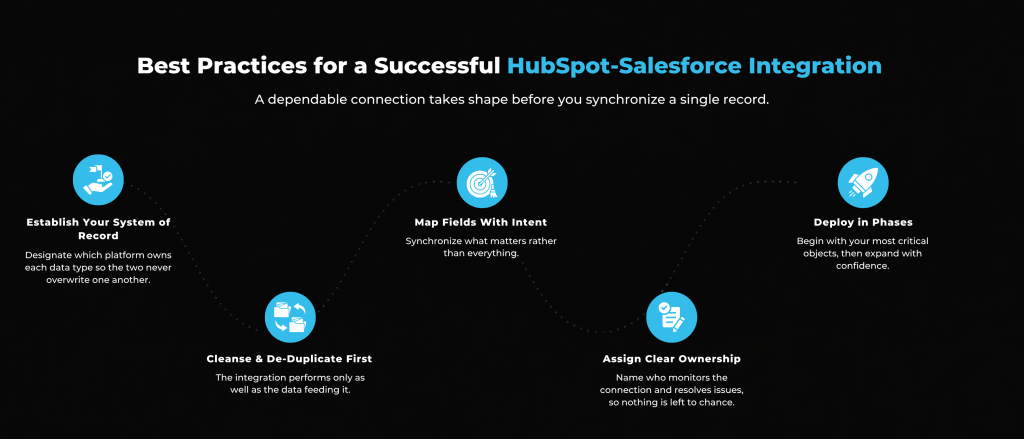
A dependable connection takes shape before you synchronize a single record:
- Establish your system of record — designate which platform owns each data type so the two never overwrite one another
- Cleanse and de-duplicate first — the integration performs only as well as the data feeding it
- Map fields with intent — synchronize what matters rather than everything
- Assign clear ownership — name who monitors the connection and resolves issues, so nothing is left to chance
- Deploy in phases — begin with your most critical objects, then expand with confidence
How Arissa International Helps
As a HubSpot Gold Solutions Partner, Arissa International helps businesses architect, configure, and sustain their HubSpot Salesforce integration. From mapping fields and establishing your system of record to auditing the CRM structure and aligning your workflows, our team ensures that both platforms operate as a single, reliable system. Moreover, through ongoing managed support, we keep your integration clean, consistent, and ready to scale as your data and your business grow.
Bringing Your Platforms Together
Connecting HubSpot and Salesforce transforms two separate systems into one unified revenue engine. Configured with care, it equips your teams with the shared, accurate data they need to market with precision and sell with confidence. If you are still deciding whether to run both platforms in tandem or consolidate onto one platform, our team can help you make that choice. When you are ready to connect your tools the right way, book a consultation with Arissa International and build an integration designed to last.
Frequently Asked Questions (FAQs)
The native connector carries no separate license fee, yet it requires paid HubSpot (Professional or Enterprise) and Salesforce subscriptions to operate. Third-party tools and custom builds introduce additional costs.
The native integration synchronizes at regular intervals, typically around every fifteen minutes, rather than instantly. Specific field changes trigger an update, while others wait for the next cycle.
A standard native setup can be ready within a few hours to a few days. Configurations involving custom workflows and rigorous testing may extend to several weeks.
The native connector excels with standard objects and offers narrower support for custom objects. Extensive use of custom objects typically warrants a third-party tool or custom development.
Yes. You can connect a Salesforce sandbox to safely rehearse your sync settings before linking to your live production environment.
On first connection, it can sync your existing records based on your inclusion list and settings, not just new activity. You control the scope, so only the records you want flow across.
Not for standard use, since the native connector is designed for marketing and sales administrators. A developer is typically necessary for custom objects, complex logic, or API-based builds.
Yes. Arissa International audits existing setups, resolves sync errors, and refines field mappings to restore an underperforming integration to reliable performance.