
See Your HubSpot Portal’s True Health in 60 Seconds
 Google Partner
Shopify Partner
20+ Years of Experience
Google Partner
Shopify Partner
20+ Years of Experience
Google Partner
Shopify Partner
20+ Years of Experience
Google Partner
Shopify Partner
20+ Years of Experience
Most HubSpot portals are full of invisible problems — contacts without owners, deals with no value, stale lists, orphaned tasks, and pipelines missing won/lost stages. None of it throws an error, so nobody notices. But it quietly breaks reporting, slows the team, and leaks revenue.
Arissa’s HubSpot Audit Tool connects to your portal read-only, runs 100+ data-quality checks across 12 core areas, and hands you a 0–100 health score with a severity-rated, prioritized list of what to fix first.
Finding CRM Problems Shouldn’t Take Days of Spreadsheet Work
A HubSpot portal accumulates problems the way any system does: records created without owners, properties added and forgotten, lists built for one campaign and never deleted, deals that passed their close date months ago and are still open.
The hard part isn’t fixing these issues — it’s finding them. Auditing a portal manually means exporting every object, cross-checking properties, associations and dates, and doing it again next quarter. Most teams never get around to it, so the data degrades and the reports built on it drift further from the truth.
Arissa’s HubSpot Audit Tool does that work in under a minute every time you run it and tells you what matters most.
What the HubSpot Audit Tool Provides
One Score for the Whole Portal — and One for Every Part of It
Leadership needs a single number. The team fixing the data needs to know where that number comes from.
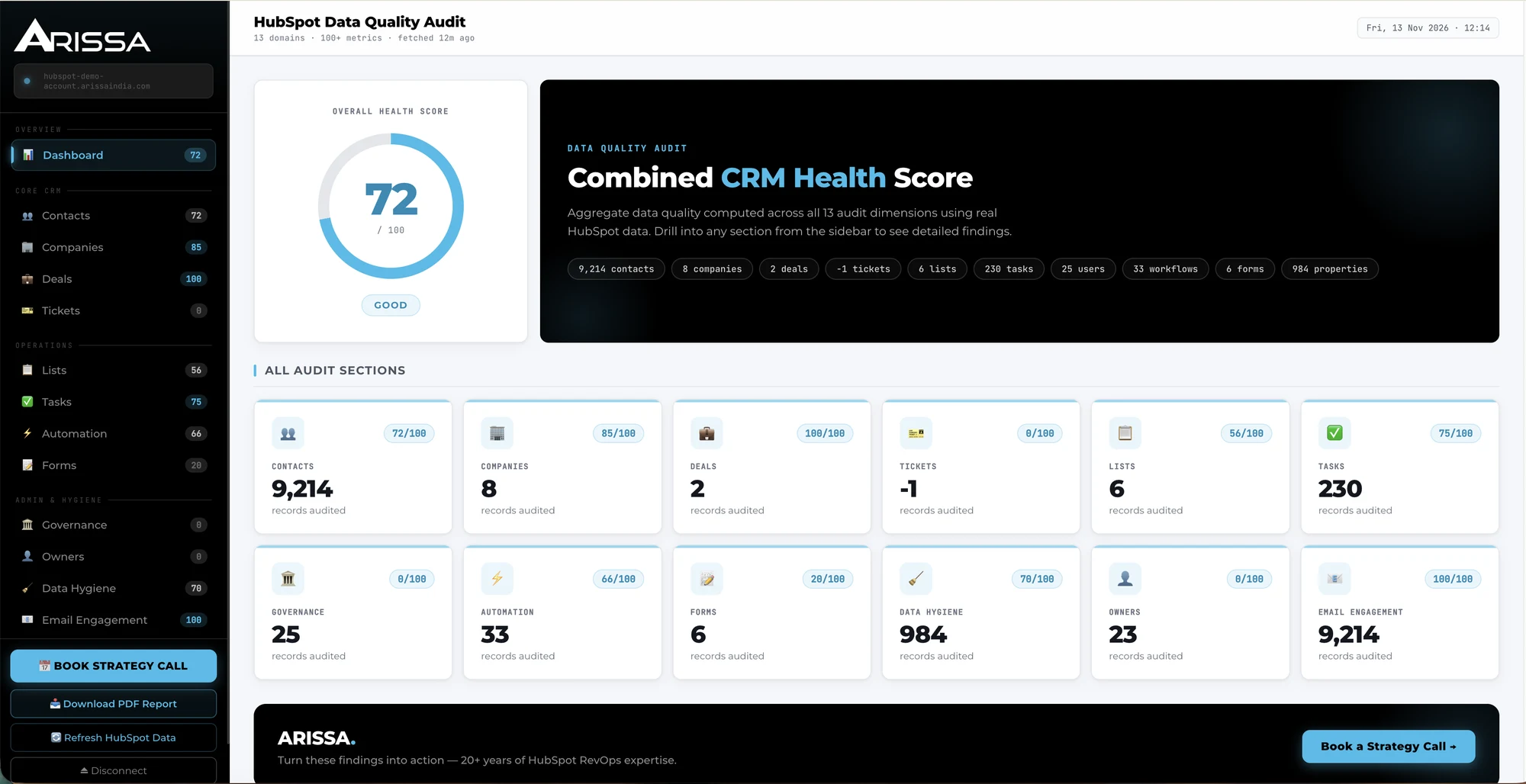
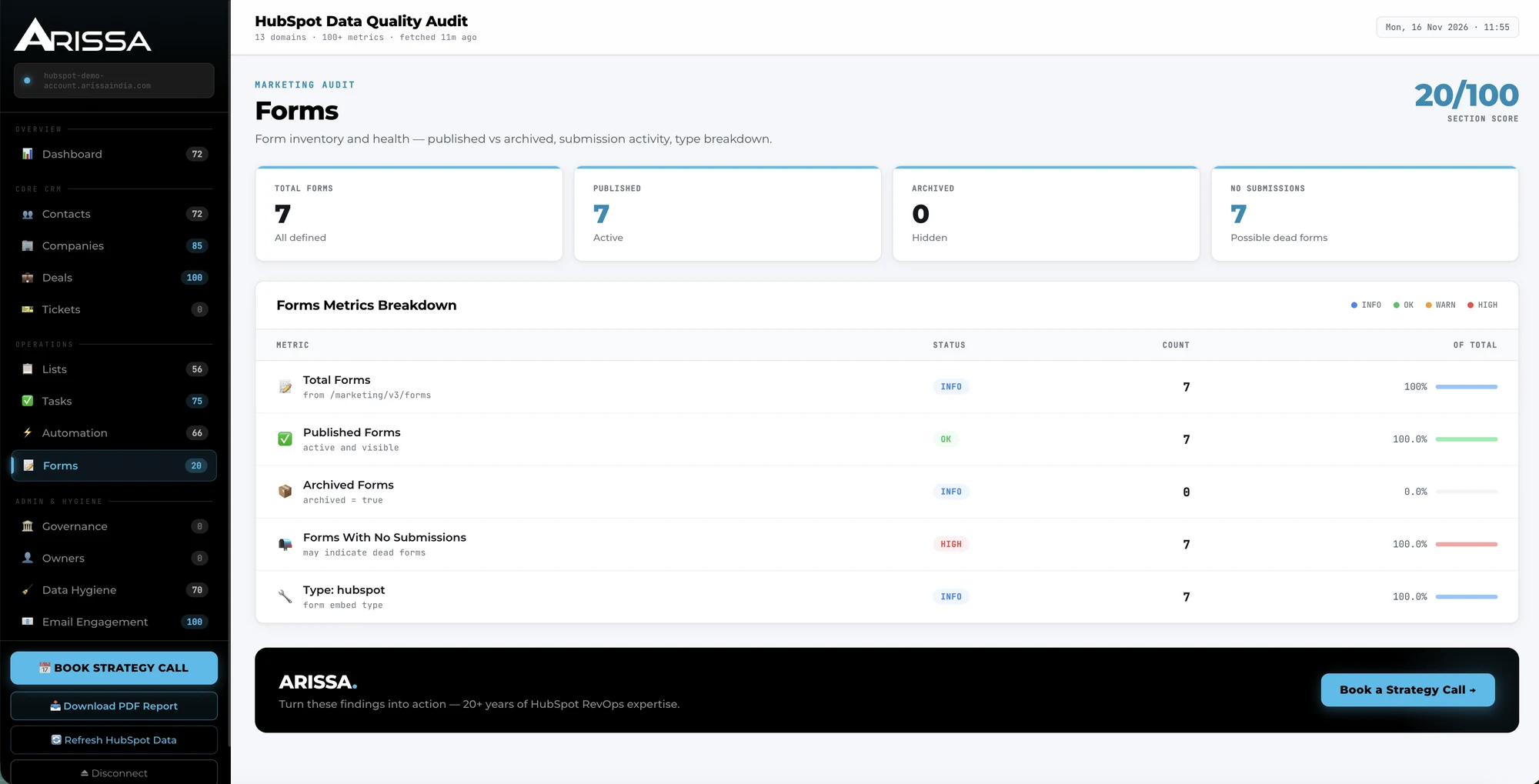
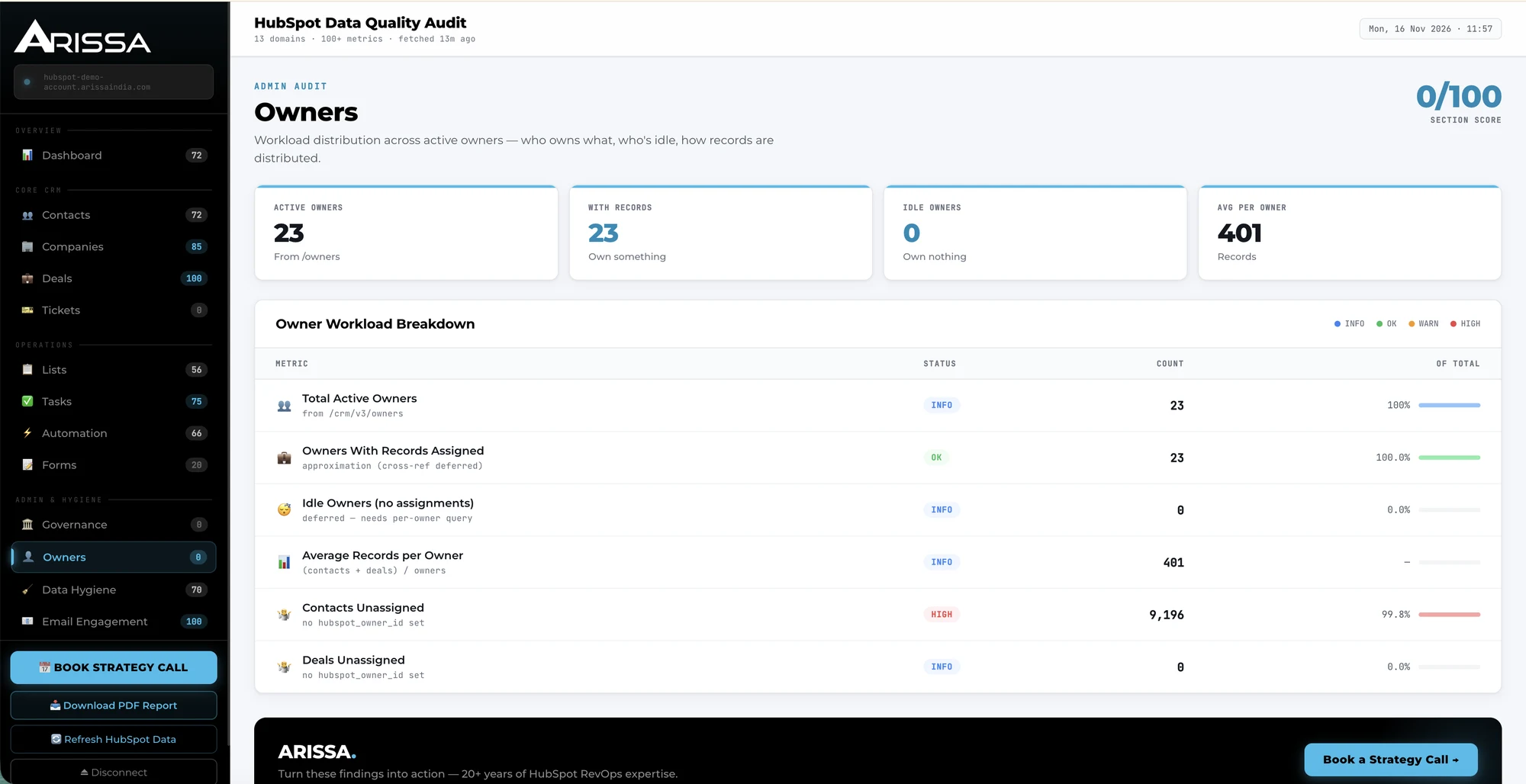
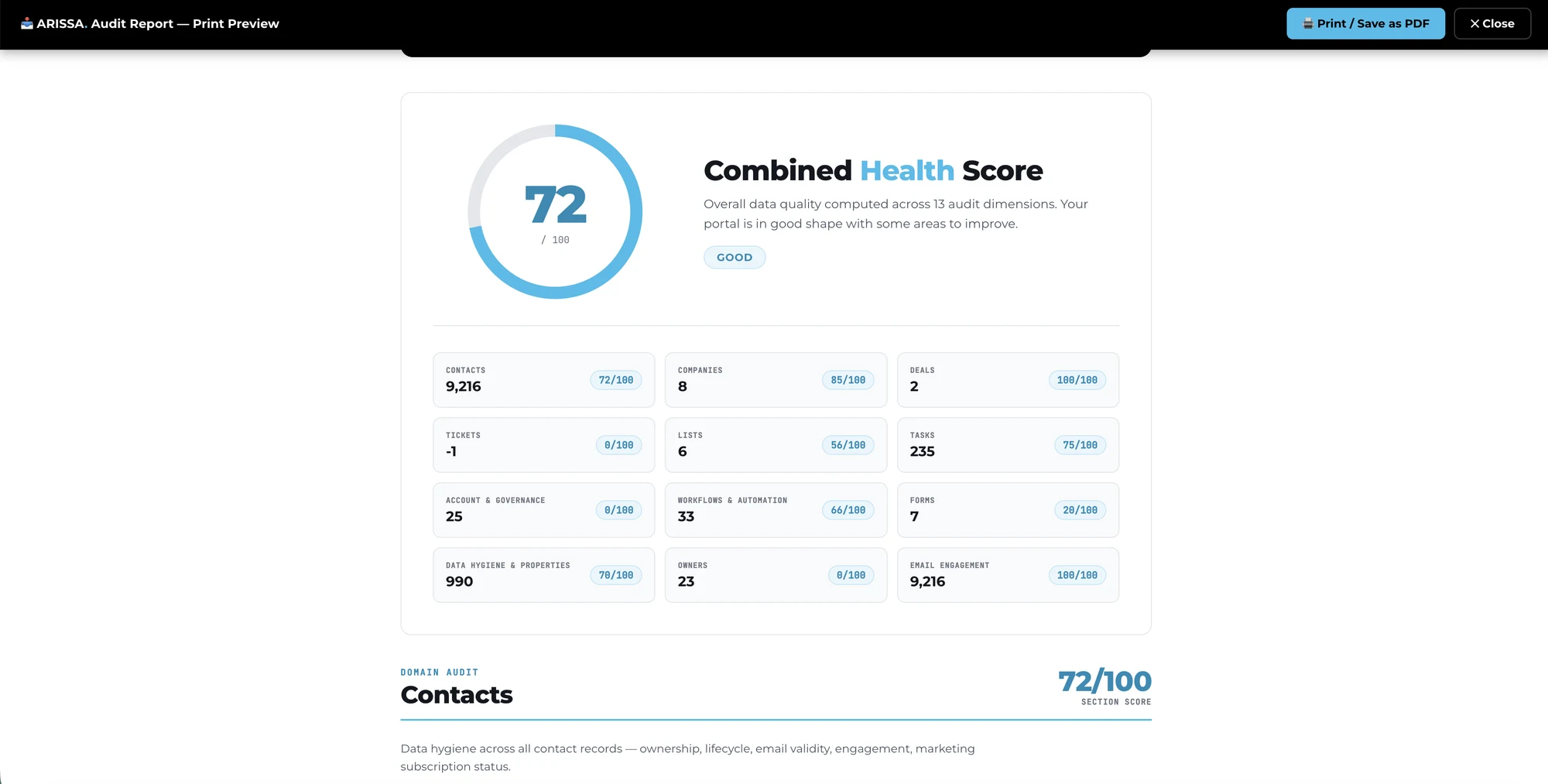
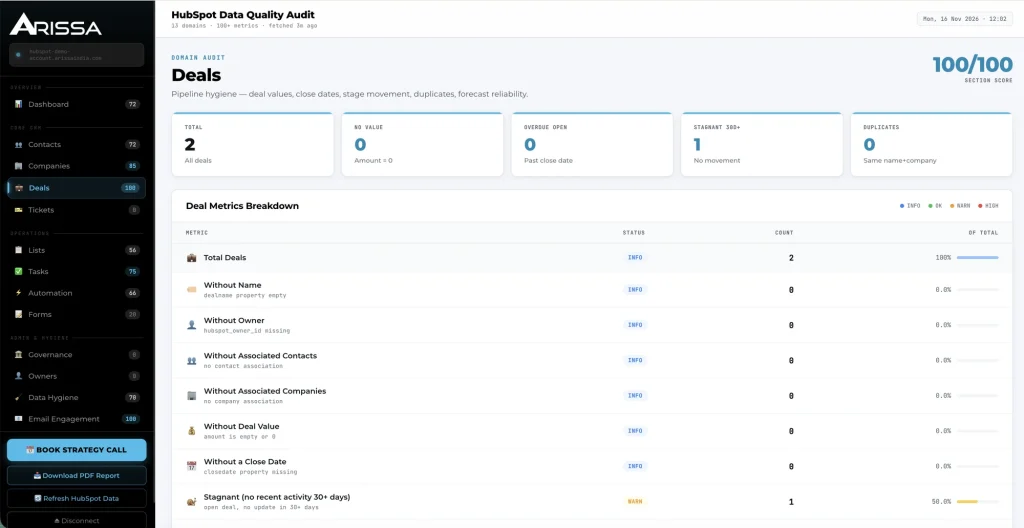
The dashboard opens with the Combined CRM Health Score, computed across all dimensions from live HubSpot data, with record counts for contacts, companies, deals, tickets, lists, tasks, users, workflows, forms and properties. Below it, every audit section shows its own score and the number of records audited, and opens into a full metric breakdown.
Overall Health Score
A 0–100 score with a plain-language rating, refreshed each time you re-run the audit.
Section Scores
Twelve scores, one per dimension, so, for example, a 71 overall can be traced to a 0 in Deals and a 33 in Owners.
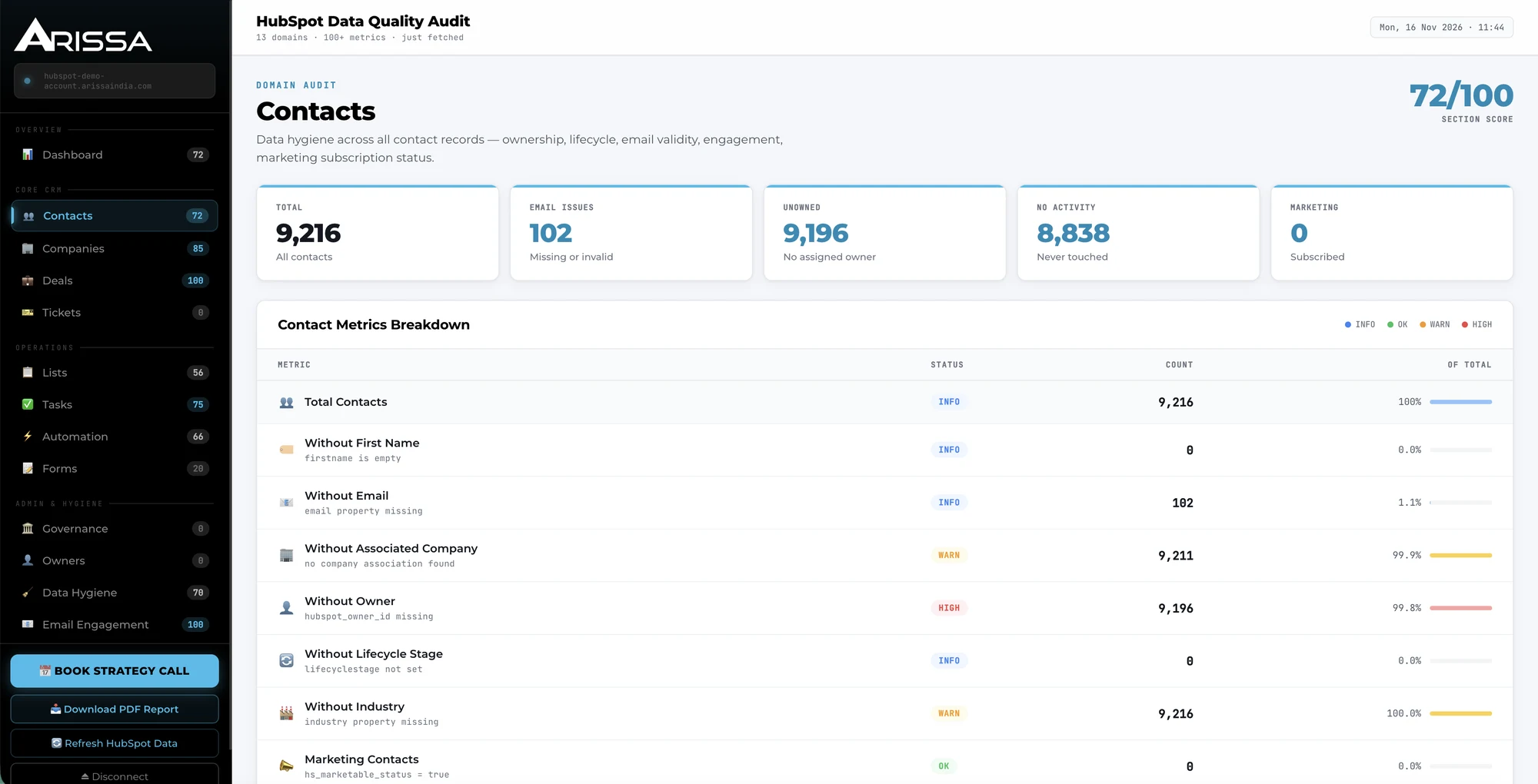
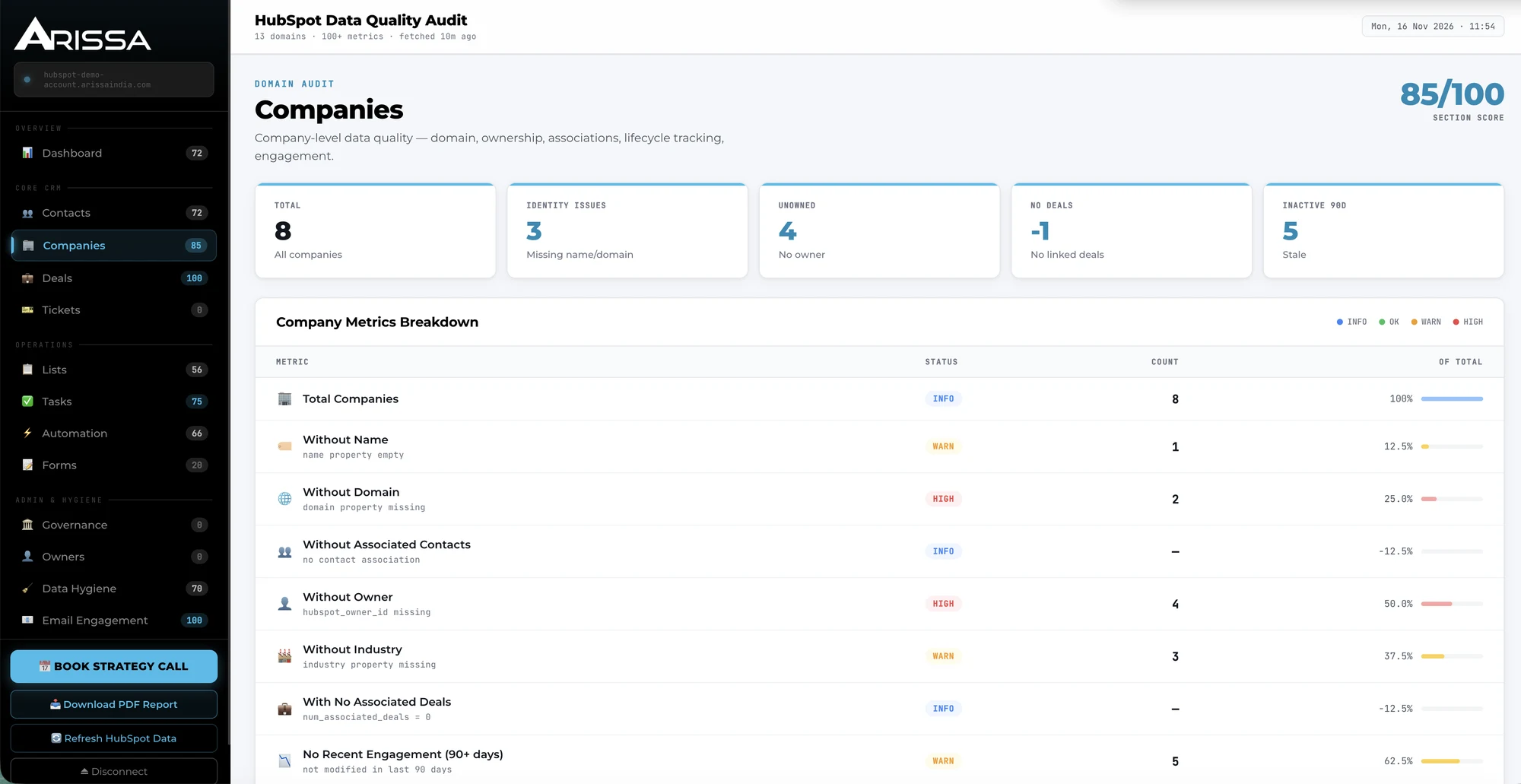
Metric Breakdown Tables
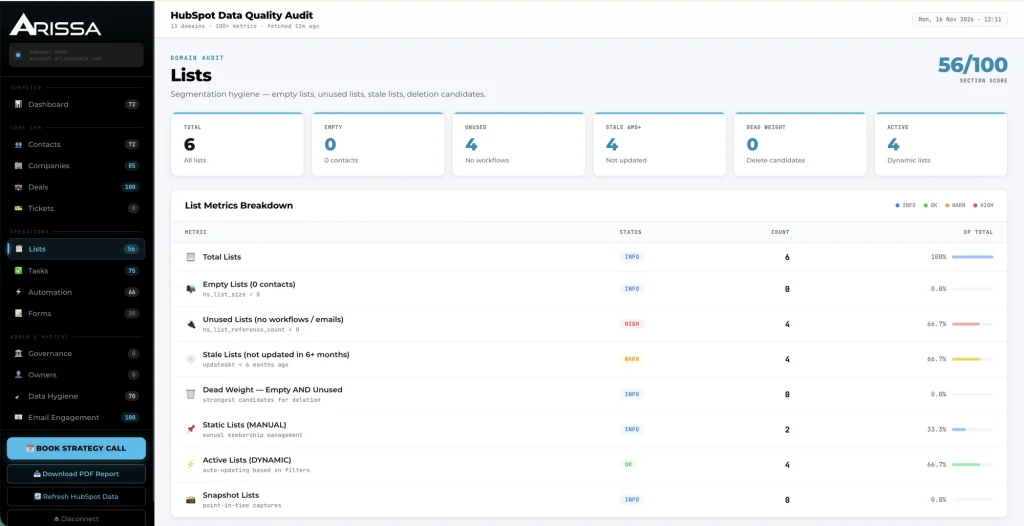
Each section lists every check with its status, the count of affected records and the share of the total — with the HubSpot property or rule behind it shown under each metric.
Clean Up the Records Your Pipeline Depends On
Contacts, companies, deals and tickets are where revenue data lives. They’re also where it goes wrong first.
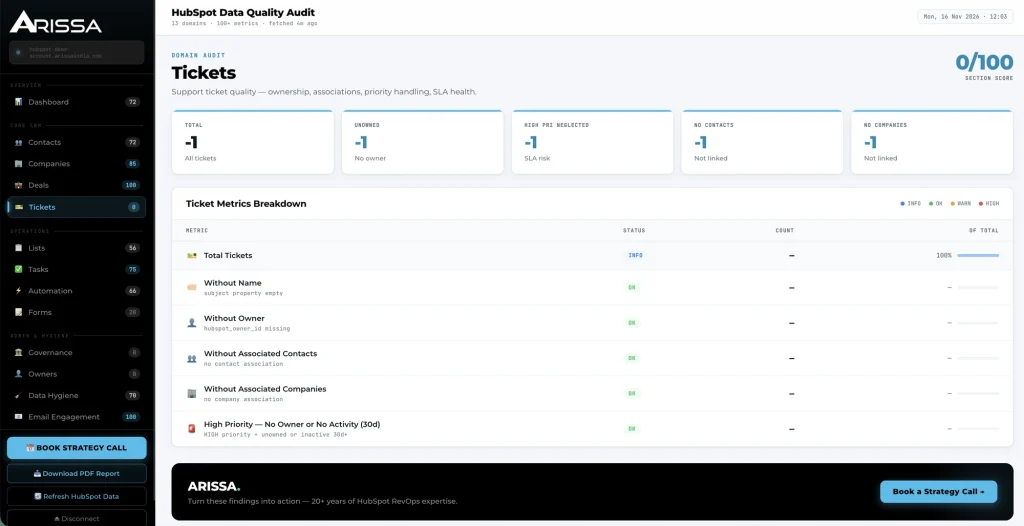
The Core CRM sections check every record for the fields, owners and associations that reporting relies on, and flag the records that are stale, unassigned or inconsistent.
Contacts & Companies
Missing owner, lifecycle stage, industry, email or domain; no associated company or contacts; no activity or engagement in 90 days; outdated lifecycle stage; invalid email format; marketing status and bounce history. Clean records here are the foundation of accurate segmentation, routing and account-based reporting.
Deals
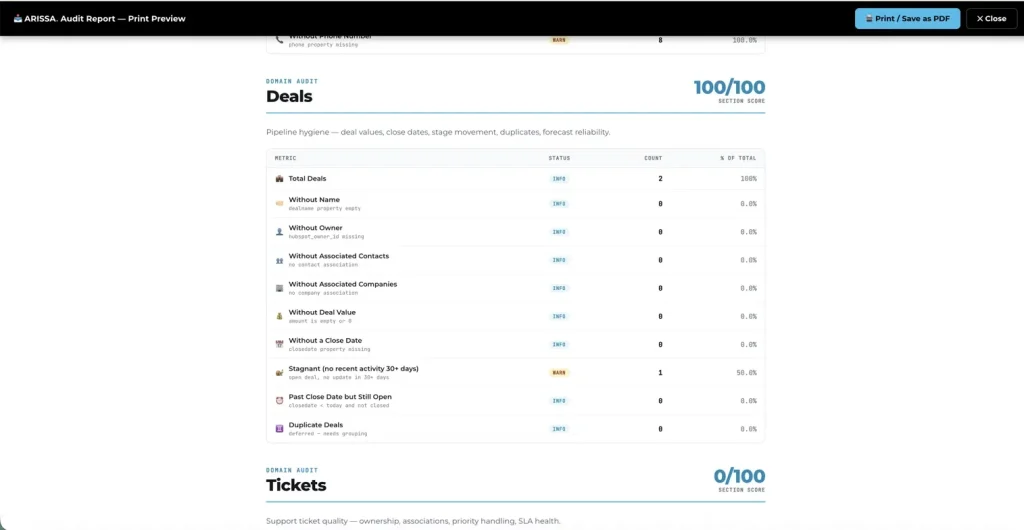
Missing value, close date, owner or associations, stagnant 30+ days, past close date but still open, duplicate deals. Pipeline hygiene is the difference between a trustworthy forecast and a misleading one.
Tickets
Missing owner or associations; high-priority tickets with no owner or no activity in 30 days — the SLA risks that surface too late.
Find the Operational Clutter That Slows the Team Down
Lists, tasks, workflows and forms don’t show up in revenue reports — until they get in the way of them.
Lists
Empty lists, unused lists with no workflows or emails, lists not updated in six months, and “dead weight” lists that are both empty and unused — the strongest deletion candidates. Bloated list libraries slow teams down and clutter automation.
Tasks
Overdue, no due date, no association, no owner, no subject, and tasks still assigned to deactivated users — the work slipping through the cracks.
Workflows & Forms
Active and paused workflow inventory by type, plus published, archived and no-submission forms that may be dead lead-capture points at the top of your funnel. Workflow checks require Marketing Hub Professional or Enterprise.
Catch the Setup and Schema Risks Nobody Checks
Portal configuration is set once and rarely revisited. That’s where security and reporting risks hide.
Account & Governance
Total users, super-admin accounts against a recommended threshold, users without roles or teams, and pipeline configuration — including pipelines missing won/lost stages that break close-rate reporting.
Owners
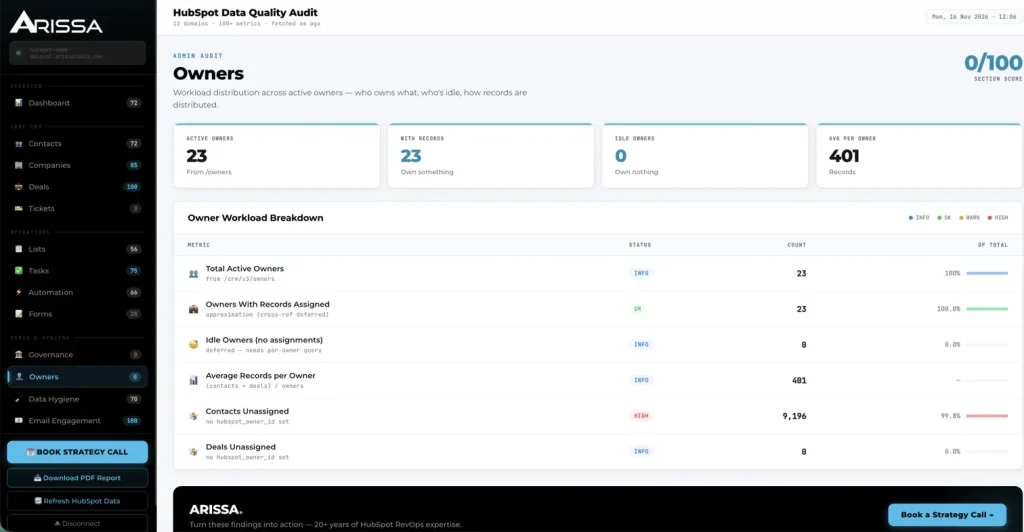
Active owners, owners with and without records, average records per owner, and unassigned contacts and deals — so you can see who’s overloaded and what’s falling through.
Data Hygiene & Email Engagement
Total, custom, default and archived properties per object to keep the schema lean and reporting fast; and send recency, reply rates and hard bounces to protect sender reputation and surface disengaged segments.
Read-Only, Refreshable, and Yours to Share
Teams won’t connect a tool to their CRM unless they trust it, and won’t act on findings they can’t share.
100% Read-Only
Secure HubSpot OAuth with read-only scope. The audit never creates, edits or deletes anything in your portal, your portal data is processed on Arissa’s servers to calculate your score, and you can disconnect at any time.
Refresh on Demand
Re-pull HubSpot data and re-score the portal after a cleanup to see what changed. The dashboard shows when data was last fetched.
PDF Report
One click produces a print-ready report with the customer, portal and audit date on the cover, the combined score, and every section’s findings.
See how this could work for your portal.
How the Audit Fits Into Your Week
Connect
Click Run Your Free Audit and authorize through HubSpot’s official OAuth screen, read-only.
Score
Within about a minute, see the Combined CRM Health Score and every section’s score.
Prioritize
Open the sections scoring lowest and focus on High and Warning findings.
Fix
Work through the affected records in HubSpot — the audit names the property or rule behind each check.
Refresh
Re-run the audit to confirm the score moved.
Share
Export the PDF for leadership, or book a consultation for hands-on help with what’s left.
Connect
Click Run Your Free Audit and authorize through HubSpot’s official OAuth screen, read-only.
Score
Within about a minute, see the Combined CRM Health Score and every section’s score.
Prioritize
Open the sections scoring lowest and focus on High and Warning findings.
Fix
Work through the affected records in HubSpot — the audit names the property or rule behind each check.
Refresh
Re-run the audit to confirm the score moved.
Share
Export the PDF for leadership, or book a consultation for hands-on help with what’s left.
From Hidden Problems to a Prioritized Fix List
- Data problems found when a report looks wrong
- Manual exports and spreadsheet cross-checks
- No way to tell what to fix first
- Pipeline and admin config never reviewed
- Audit findings stuck in one person’s notes
- One-time cleanup, then drift
- 100+ checks run in 60 seconds, read-only
- 12 dimension scores and one combined score
- Every finding rated OK, Info, Warning or High
- Pipeline, super-admin and role checks included
- Print-ready PDF report for the team or leadership
- Refresh and re-score after every cleanup
Built for Teams Who Depend on Clean HubSpot Data
RevOps & Sales Operations
Trustworthy forecasts start with deals that have values, close dates and owners. This finds the ones that don’t.
Marketing Operations
Clean lists, live forms and a healthy sender reputation — without auditing each by hand.
HubSpot Admins & Agencies
A repeatable health check for every portal you manage, with a PDF you can hand to the client.
The audit logic reflects Arissa’s hands-on HubSpot and RevOps experience as a HubSpot Gold Partner: every check and severity rating is based on what actually matters for reporting accuracy, pipeline hygiene and revenue operations — not generic rules.
Find Out What Your CRM Is Costing You
Run your free audit in 60 seconds, see your score, and get a prioritized list of what to fix.
Or talk it through with our RevOps team.
Related Arissa Solutions
Frequently Asked Questions
Is the HubSpot Audit Tool safe to connect?
Yes. It uses HubSpot’s official OAuth with read-only access and never writes to your portal. Your portal data is processed on Arissa’s servers to calculate your score, and you can disconnect from the dashboard at any time.
Is it really free?
Yes. The audit, the dashboard and the PDF report are free with no commitment. Arissa’s paid services start only if you want hands-on help with the fixes.
How long does it take?
About 60 seconds from connecting to seeing your score. Refreshing after a cleanup takes the same.
What does it check?
100+ checks across 12 core areas: contacts, companies, deals, tickets, lists, tasks, workflows, forms, governance, owners, data hygiene and email engagement.
How is the health score calculated?
Each section is scored 0–100 from its findings, and the combined score aggregates all sections. Findings are rated OK, Info, Warning or High, so the score reflects severity, not just count.
Does it work on every HubSpot tier?
Most checks run on any tier. Workflow and automation checks need Marketing Hub Professional or Enterprise, because HubSpot’s workflows API isn’t available below that.
Can I share the results?
Yes. Download a print-ready PDF report with the combined score and every section’s findings.
Does Arissa fix the problems too?
The audit tells you what to fix and why. For hands-on remediation, see Arissa’s HubSpot Audit Service or book a consultation.