Digital marketing teams collect performance data from multiple platforms every day. Google Analytics, Google Search Console, email marketing, social media, YouTube, and other channels each provide different pieces of the picture.
Arissa built a centralized Analytics & Reporting dashboard that brings these performance insights together in one place, making it easier to track project performance, compare results over time, and prepare client reports.
Understanding how a project is performing often means checking multiple platforms and bringing the information together manually.
The Analytics & Reporting dashboard provides a centralized view of relevant digital performance data so teams can spend less time switching between platforms and more time understanding what the data is showing.
Instead of looking at each channel separately, teams can use one dashboard to review project performance across multiple digital touchpoints.
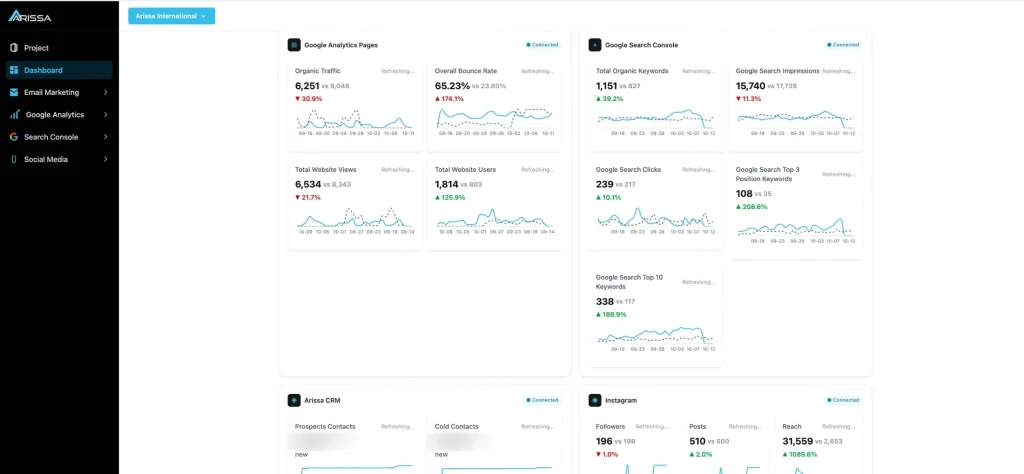
Monitor website performance and activity through metrics such as:
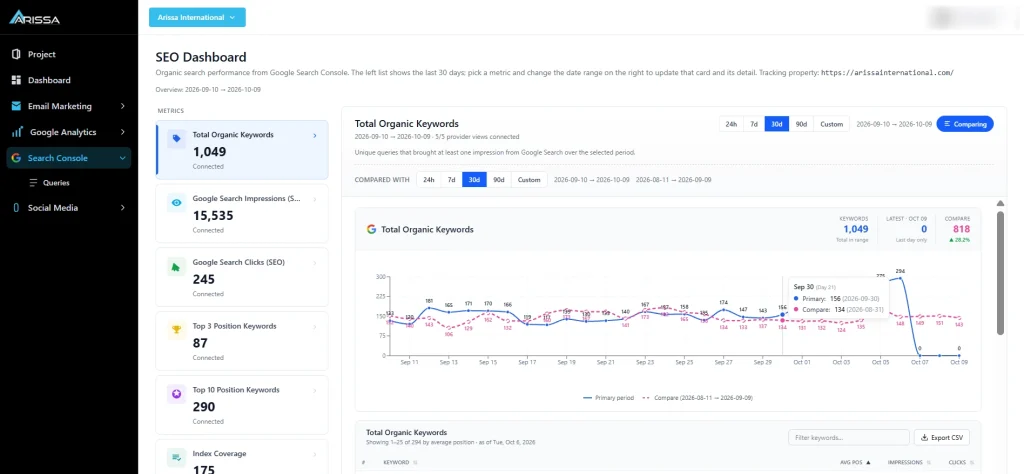
Track organic search performance and understand how a project is performing in Google, including:
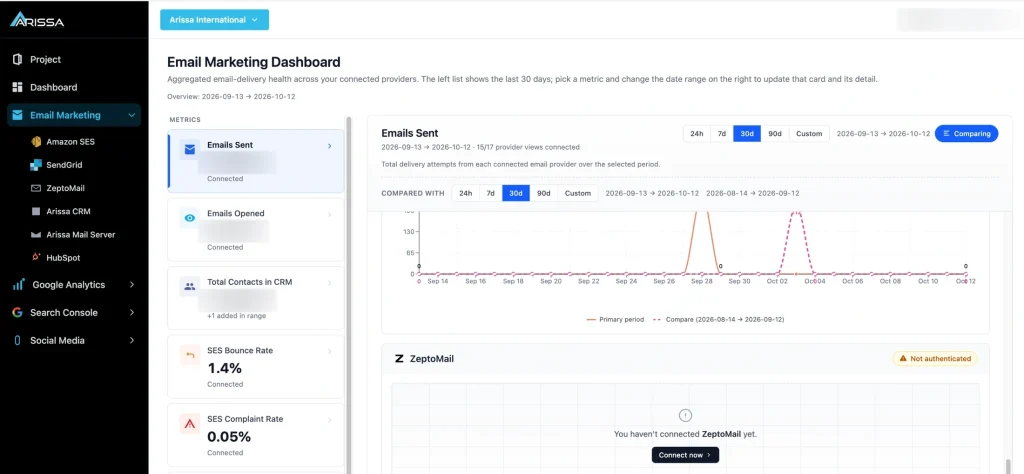
Bring email marketing activity into the same reporting environment. The dashboard can track information such as:
The current reporting environment works with email marketing sources, including:
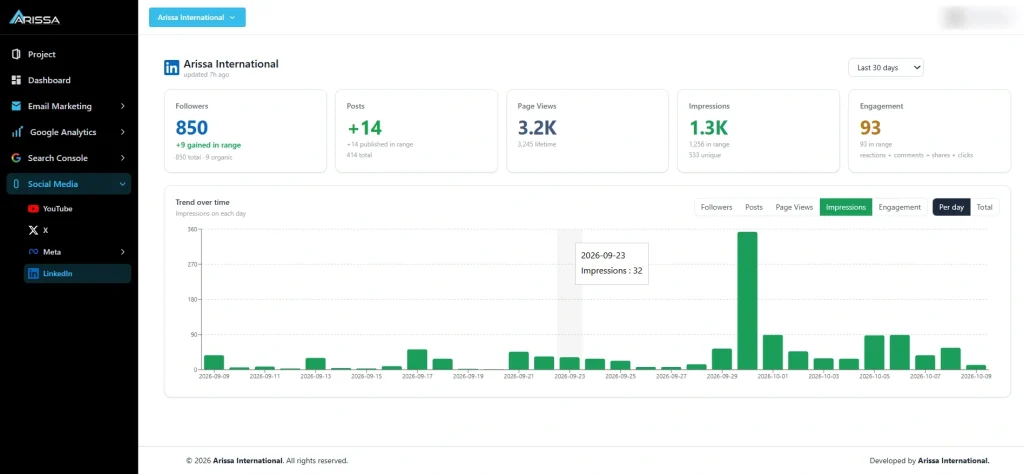
Track relevant social media performance alongside other digital marketing channels, giving teams a broader view of project activity.
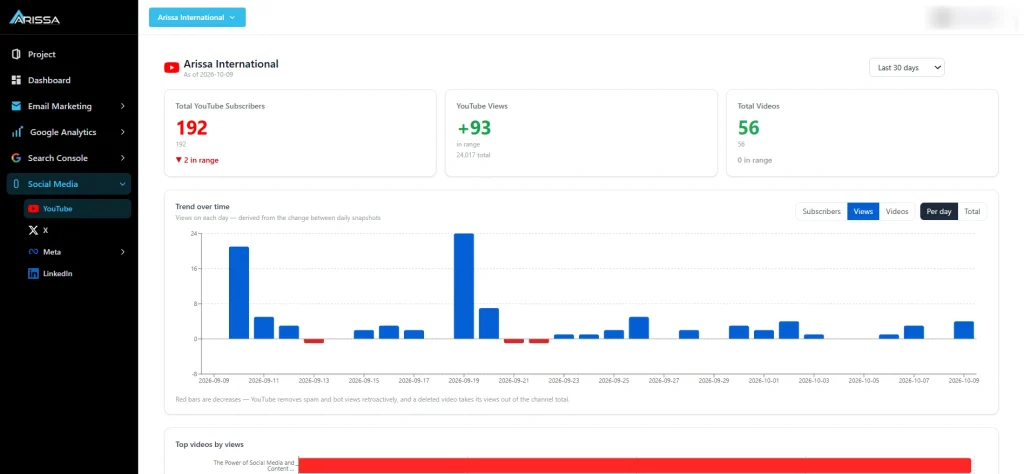
Monitor relevant YouTube performance and include it alongside other digital channels in the same reporting environment.
Looking at one month’s numbers only provides part of the picture.
The dashboard allows teams to compare current performance with previous-period data to understand how a project is progressing.
This helps teams identify:
Changes in performance
Growth or decline across channels
Differences between reporting periods
Areas that may require further attention
Instead of preparing separate comparisons across different platforms, the information can be reviewed from a centralized dashboard.
The original requirement for the Analytics & Reporting application came from the need to prepare performance reports for clients.
Digital marketing teams were already tracking information such as:
The challenge was bringing all of this information together.
Arissa developed the dashboard to provide a centralized place where this information could be reviewed and used as part of the reporting process.
The dashboard is not limited to a single marketing channel. It provides a broader view of how a project is performing across the digital platforms being tracked.
Understand how the project is performing in organic search.
Review website activity and relevant Google Analytics data.
Monitor email marketing activity and performance.
Review relevant social media activity.
Track YouTube performance alongside other digital channels.
Arissa’s Custom-Built Applications portfolio includes an Analytics & Reporting application designed around centralized project performance tracking.
An executive dashboard delivering project performance insights through centralized analytics and progress tracking.
Documented areas include:
The application demonstrates how Arissa can build a reporting environment around a specific business workflow rather than requiring teams to work across disconnected platforms.
Collect
Relevant performance information is collected from the digital platforms being tracked.Centralize
The information is brought together into the Analytics & Reporting environment.Organize
Data is presented in a structured dashboard so teams can review different areas of project performance.Compare
Current performance can be compared with previous reporting periods.Report
The centralized information can be used by digital marketing teams when preparing project and client performance reports.Reduce the need to switch between multiple platforms when reviewing project performance.
Compare current and previous performance to understand changes over time.
See performance across search, website activity, email, social media, and YouTube.
Use centralized performance information as part of the client reporting process.
Reduce the need to collect information separately from each platform before reviewing performance.
Every project can have different platforms, metrics, and reporting requirements.
The Analytics & Reporting application provides a foundation for bringing relevant project performance information together in one place.
The goal is simple: Make it easier to understand how a project is performing across its digital channels.
Bring relevant digital performance data together and make project reporting easier to review.